Understanding battery fundamentals for portable devices
Chemistry and voltage basics
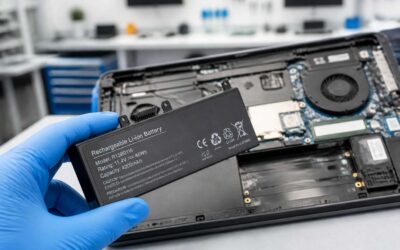
Power writes the cadence of daily life; in South Africa’s offices, cafés, and classrooms, devices rise and fall with a stubborn rhythm. A common figure suggests batteries shed around 20% of capacity in the first two years, a reminder that nothing stays full forever. The laptop battery vs mobile comparison becomes a study in design and energy’s poetry.
Understanding battery fundamentals hinges on two sources: chemistry and voltage. Lithium-ion dominates today, with solid-state chemistries on the horizon. Voltage tells how many volts a cell can deliver, while packs arrange cells in series and parallel to meet power needs.
- Chemistry trends: lithium-ion vs solid-state
- Voltage basics: cell voltage ranges
- Pack architecture: series and parallel scaling
From laptops to mobiles, energy geometry—how big, how light, how fast it flows—colors every design choice. Laptops demand higher density and tighter heat management; mobiles seek lighter weight and quicker acceptance, shaping daily power.
Energy capacity and measurement terminology
Power is the quiet conductor of our daily grind, guiding every email and meeting. For portable devices, energy capacity writes the cadence of work: how long a screen stays lit, how long a charge lingers between plug-ins. In this choreography, the rhythm matters more than flash.
Capacity isn’t a single blunt figure; it speaks in Wh, mAh, and Ah, offering a map rather than a trap. Wh measures the energy tucked into a battery; mAh and Ah quantify charge at the nominal voltage; energy density shares how much energy sits in each gram or cubic centimeter. Here are the core terms that travel with every charge:
- Watt-hours (Wh): stored energy, the true bite of a full pack
- Milliamp-hours (mAh) and Amp-hours (Ah): patient markers of usable charge
- Energy density: energy per unit mass or volume
- C-rate: how quickly a battery can safely deliver power relative to its capacity
Ultimately, the laptop battery vs mobile reveals how design priorities shape daily life: denser packs promise endurance; lighter footprints enable mobility. The drama unfolds in voltage, current, and microphysics, but the audience—users in South Africa—feels only the lasting glow of a well-tuned energy story.
Battery aging and cycle life
Endurance is the quiet spell that keeps laptops plotting email routes and phones chasing deadlines. In the saga of laptop battery vs mobile, the unseen villain is time—aging that erodes capacity even as you keep using it. A veteran designer proclaims, “Battery aging is the silent bookmark marking how long a device remains your faithful companion.”
Understanding battery fundamentals for portable devices isn’t about chasing jargon; it’s the chorus of cycles and heat that tune longevity. Li-ion packs typically endure hundreds of full charge–discharge cycles before noticeable fade, and the pace of decline obeys temperature, charge rate, and depth of discharge. In South Africa’s varied climates, heat management becomes a daily factor.
- Cycle life and capacity fade
- Temperature effects and thermal management
- Depth of discharge and smart charging practices
This is the rhythm of design, where endurance and mobility dance on the edge of a well-tuned energy story.
Impact of temperature on performance
Heat is the quiet saboteur that shows up on the hottest days and whispers through a device’s battery life. In the laptop battery vs mobile conversation, temperature isn’t trivia—it shapes how long a charge lasts and how smoothly a task runs. When temps rise, chemical reactions slow, resistance creeps up, and performance can sag even before you hit the charger.
- Higher internal resistance at elevated temperatures reduces usable capacity.
- Thermal stress accelerates aging of components and can trigger safety limits.
- Cooling efficiency governs peak performance and sustained run-time.
In South Africa’s varied climates, heat management isn’t a luxury—it’s a daily consideration for workers, students, and families navigating the laptop battery vs mobile narrative with steadiness and care.
Real-world battery life: laptops vs smartphones
Screen usage and processing power demands
Real-world battery life paints a portrait where laptops endure marathon work sessions and smartphones crave frequent top-ups. Across screens and processors, the rhythm of daily life in South Africa shapes energy use, turning “laptop battery vs mobile” into a practical question every commuter and creator asks.
- Bright displays and high refresh rates draw more energy.
- Background apps keep radios and CPUs active.
- Editing, gaming, and video streaming spike power use.
- Mobile networks shift between efficient and hungry modes.
Screen usage and processing power demands are a study in contrast: the email check and document editing on a laptop often demand longer sustained throughput, while a smartphone thrives on burst performance and rapid wake-up cycles.
Background tasks and idle drain
Across South Africa’s busy corridors, the real-world dance of energy reveals two stars: laptops that carry a day’s work and phones that crave frequent top-ups. In SA, the average smartphone is recharged several times daily, while a capable laptop keeps the clock running longer.
Background tasks keep radios and chips on the go, even when you aren’t actively typing. Idle drain matters more than you think, especially on staggered network signals and warm rooms.
- Background app activity and push services
- Always-on radios (cell, Wi‑Fi, Bluetooth)
- Scheduled updates and media syncing
Real-world usage defines the contrast: laptops reward sustained throughput with measured endurance, while smartphones thrive on burst power and rapid wake-ups. That laptop battery vs mobile reality keeps you connected through meetings, edits, and quick bursts of creativity.
Typical screen-on time benchmarks
Across South Africa’s bustling corridors, the real-world duel unfolds in the glow of screens and humming batteries. Laptops carry a day’s work, while phones crave frequent top-ups. In SA, the average smartphone is recharged several times daily, while a capable laptop keeps the clock ticking through meetings, edits, and late-night drafts. This is the quiet truth of the laptop battery vs mobile reality: endurance writes the chapter, even as network signals flutter and rooms warm with the soft ache of power.
Real-world usage refuses to bow to glossy benchmarks. Laptops reward sustained throughput; smartphones shine with bursts and rapid wake-ups. The rhythm shows up in everyday moments—long documents, quick edits, and the occasional sprint to save a file.
- Extended tasks with steady processing power
- Bursts for calls, messages, and quick updates
- Frequent charging cycles for mobile devices
Charging patterns and battery health impact
“Endurance is the new speed,” a device designer once said, and in South Africa that truth sits in every desk glow and pocket beacon. Real-world battery life pits the quiet, stubborn stamina of laptops against the sudden wakefulness of smartphones. The debate—laptop battery vs mobile—is no gimmick; it’s a real-life measure of how work, calls, and chats ride on a single charge.
Charging patterns shape long-term health more than marketed capacity. Laptops often ride through hours of steady processing, while mobiles cycle top-ups all day, which can stress cells differently. In practice, a few balanced habits help preserve health:
- Extended sessions under sustained load without heat spikes
- Short bursts for calls and quick updates
- Regular, gentle top-ups for mobile devices
Power optimization strategies that extend life
Endurance is the new speed, a designer once whispered, and in South Africa that truth glows from desk lamps and pocket screens. Real-world battery life often boils down to the laptop battery vs mobile split, where a laptop labors through hours of steady work while a phone wakes for every ping. The balance isn’t a gimmick; it’s a daily measure of endurance!
Power optimization strategies extend life as much as hardware allows—patterns over promises. Focus on rhythm:
- Adopt energy-efficient modes and staggered syncing
- Choose network activity wisely; data drains quickly
- Maintain balanced heat by pacing heavy tasks
Ultimately, the laptop vs mobile equation isn’t just about capacity; it’s about how you work. When usage lines up with device strengths, both can carry a long South African day with steadier glow.
Charging ecosystems and technology
USB-C Power Delivery and fast charging standards
Power moves faster than we expect! In today’s tech landscape, a single USB-C charger can keep laptop battery vs mobile in rhythm, reshaping how we think about energy and daily work.
USB-C Power Delivery negotiates voltage and current between charger and device, letting a compact brick feed a laptop or a phone with ease. Fast charging standards converge here, drawing strength from cross‑device compatibility and intelligent safety protocols. In South Africa, this ecosystem reduces clutter in offices and supports reliable use even where power supplies vary.
- Cross-device compatibility
- Smart power negotiation and safety
- One charger, many devices
The story becomes a matter of ecosystem resilience, where cables, ports, and protocols collaborate to keep pace with our demanding schedules.
Wireless charging differences and practicality
Power moves fast, and in South Africa’s busy offices a single charger can keep laptop and phone in step. The phrase laptop battery vs mobile captures how ecosystems bend energy to work, turning cluttered desks into streamlined hubs that hum with intelligent negotiation!
Consider these facets of the ecosystem:
- Cross-device interoperability energizes laptops and phones
- Smart negotiation and safety guard heat and wear
- Desk-ready setups reduce clutter across SA offices
I’ve learned wireless charging promises convenience, yet it tests alignment and heat management. Placement matters, and efficiency lags behind wired options when speed is crucial. Still, its rhythm suits daily routines, especially where desks reflect the understated elegance of South African offices!
Charger wattage, compatibility, and adapters
Charging ecosystems operate like a quiet orchestra in a sunlit South African office. A single charger can keep devices in step, yet the true power lies in understanding charger wattage as the conductor. When you consider laptop battery vs mobile, you glimpse two rhythms sharing one stage, each hungry for safe, timely energy.
Compatibility is the melody: USB-C Power Delivery negotiates watts in real time, from phone-friendly 18W to laptop-thirsty 100W. Adapters and hubs turn mismatched ports into harmony, letting devices sip energy without bruising their circuits.
- USB-C PD chargers that negotiate a safe voltage for laptops and mobiles
- Multi-port adapters that blend USB-A, USB-C and legacy ports
- Desk-friendly hubs that keep cables tidy while moving energy along the ecosystem
On busy desks, this quiet negotiation reduces clutter and keeps momentum through a South African workday—steady, smart charging that respects heat and wear.
Safety features during rapid charging
“Power without peril is the quiet magic of rapid charging,” a veteran technician likes to say. On a sunlit South African desk, a single charger nudges a phone and a laptop along in harmonious tempo, proving speed can dance with safety.
- Smart negotiation of current and voltage between devices
- Thermal sensors and automatic current tapering to avoid overheating
- Overcharge protection and safe shutdown protocols
When we speak of charging ecosystems, the energy flow is guided by a conductor—USB-C Power Delivery—negotiating watts in real time. In laptop battery vs mobile, the same ecosystem adapts, delivering 18W to a phone or up to 100W to a laptop, all while monitoring heat and voltage to keep circuits safe.
This quiet coordination unclutters desks and preserves longevity, letting busy South African teams move with confidence through the workday.
Software and hardware power management
OS-level battery saver modes and heuristics
Power conversations bloom in the boardroom and long-haul flights. When comparing laptop battery vs mobile, the real drama isn’t raw capacity; it’s how OS and firmware choreograph energy through everyday habits and preferences.
OS-level battery saver modes deploy heuristics that trim background activity, curb display frills, and guard critical tasks.
- Content-aware display tuning: brightness and refresh rates aligned to what you see.
- Task scheduling and wake-up control to minimize idle drain.
- Smart core and GPU budgeting: keeping only what you need awake.
- Disk and memory sleep policies that cool activity when idle.
Hardware power management follows suit, passing control from the OS to firmware and PMICs. Modern laptops deploy dynamic power gating, smart sleep states, and precise wake timers that keep you productive even through load-shedding cycles here in South Africa.
Adaptive brightness and display technology
South Africa’s load-shedding reality makes every watt count. Software and hardware power management have become the quiet custodians of uptime, choreographing energy without dulling the workday. Adaptive brightness and display technology tune intensity and cadence to the room and the task, delivering clarity without glare or battery life burn.
- Ambient-light aware brightness
- Adaptive refresh rate
- Smart wake and idle scheduling
- GPU and core budgeting
- Disk and memory sleep policies
Beyond the display, firmware and PMICs tighten the reins, gating power where it isn’t needed and waking just in time to keep momentum. The laptop battery vs mobile debate isn’t just about raw capacity; it’s about how energy is stewarded across apps, sensors, and peripheral chatter, especially in a device that travels from desk to train to boardroom.
CPU/GPU throttling and performance balancing
In South Africa, uptime matters as load-shedding cycles through the day. Behind every bright screen is software and hardware power management, quietly balancing energy so you stay productive. It isn’t only watts; it’s how the CPU and GPU juggle tasks to deliver bursts of speed and then quiet stays in reserve.
CPU/GPU throttling and performance balancing are the seams where speed meets stamina. When demand spikes, clocks rise; when it wanes, they scale back to protect battery health. This dynamic keeps work responsive without overheating or gobbling power.
- Dynamic scaling of processors to match workload
- Thermal-aware gating that preserves headroom for bursts
- Workload-aware scheduling across cores and accelerators
Firmware, PMICs, and OS heuristics choreograph the rest, waking just in time to keep momentum as you move from desk to train to boardroom. That balance shapes the laptop battery vs mobile narrative more than raw capacity ever could.
Background activity controls and app management
Power is the currency of the modern day, and in South Africa uptime matters as load-shedding shapes the workday. The laptop battery vs mobile debate sharpens into a practical question—how long can you work unplugged before the next coffee break? I feel the firmware softly guiding the CPU, nudging it to sprint only when the moment demands, then slip back into reserve.
Software and hardware power management move behind the scenes, orchestrating background activity and app life with a deft hand. Essential tasks run unobtrusively; idle processes fade. The result is a quieter machine and a longer day, because every watt travels with intention, not repetition.
- Background activity throttling and exemptions
- App power budgets and permissions
- Network activity pacing and sync control
- Foreground vs background task priority
A chorus of firmware, PMICs, and OS heuristics wakes just in time to sustain momentum, whether you’re at a desk, on a train, or in a boardroom. That is the true fabric of laptop battery vs mobile—the art of staying luminous when you must, and serene when you can.
Sleep, hibernate, and wake behavior optimization
“Power is the currency of the modern workday,” and in South Africa uptime matters as load-shedding shapes the day. The laptop battery vs mobile debate sharpens on Sleep, hibernate, and wake behavior optimization. A well-tuned device greets you with instant readiness when you need it, and quietly preserves energy when you don’t — a calm battery discipline that underwrites real-world uptime during load-shedding.
- Sleep keeps memory lightly powered for a fast resume while sipping a little energy.
- Hibernate saves the state to disk, offering longer dormancy but slower wake.
- Wake behavior tuning aligns task resumption with real needs, avoiding unnecessary wakeups.
Firmware, OS, and hardware collaborate to orchestrate these modes, so you feel momentum when you need it and stillness when you don’t. In the laptop battery vs mobile landscape, the quiet politics of energy use shapes uptime and longer unplugged days.
Firmware updates and battery calibration guidance
In the laptop battery vs mobile debate, software and hardware power management behave like a quiet symphony, tuning idle drains and wake responsiveness with surgical precision. Firmware updates sharpen that balance, refining discharge curves and improving gauge accuracy so uptime feels effortless.
- Firmware updates refine power-management algorithms for smoother transitions
- Battery calibration aligns OS gauges with real capacity, reducing surprises
- Vendor tooling ensures firmware health checks stay compatible with security and power features
When these elements work in tandem, you experience consistent responsiveness and longer unplugged days without drama. This quiet orchestration keeps pace with the rhythm of a South African workday, where uptime is the real currency and every spark of power counts.
Lifecycle, replacement, and environmental impact
Replacement timelines for laptops versus mobiles
Power is the invisible negotiator on every South African desk. In the laptop battery vs mobile debate, lifespans and replacement rhythms do the talking.
Laptops, bred for endurance and heavier workloads, commonly stretch to 3–5 years with reasonable care; mobiles, subject to rapid refresh cycles and shrinking hardware, often turn over in 2–3 years. The environmental story matters too—longer lifespans mean fewer batteries to recycle and less e-waste pressure.
- Replacement timelines tilt toward longer cycles for laptops than for mobiles.
- Environmental impact compounds when devices are frequently retired and not recycled.
- South African market realities—import cycles, charging standards, and repairability shape retirement timing.
Battery recycling and disposal options
Power is the invisible negotiator on every South African desk. When weighing laptop battery vs mobile lifecycles, the difference isn’t just speed—it’s endurance, reliability, and how you work. Laptops tackle heavier workloads for years; mobiles refresh on shorter cycles, nudging budgets and planning in real time.
Lifecycle and environmental impact go hand in hand. A longer cadence keeps batteries out of landfills and reduces the overall e-waste footprint. Here are options that matter in SA:
- Local battery recycling points and drop-off days
- Manufacturer take-back programs for devices
- Certified e-waste processors that handle lithium packs safely
Battery recycling and disposal options close the loop, turning retirement into responsibility. When you consider laptop battery vs mobile, the choice becomes an act of stewardship—aligning performance with a cleaner environment and a smarter South African market.
Total cost of ownership and replacement strategies
In South Africa, the clock wears a load-shedding grin and a battery meter that never sleeps. When weighing laptop battery vs mobile lifecycles, the verdict isn’t only about speed—it’s about endurance and how consistently work gets done. Laptops tend to shoulder heavier workloads for longer stretches; mobiles refresh more often, nudging budgets and planning in real time.
To see value through a sustainability lens, the total cost of ownership matters. Consider these TCO levers:
- Long-term operating costs versus upfront price
- Resale or refurbishment value
- Reliability and uptime expectations
Lifecycle discipline reduces waste and strengthens the SA market. When retirement is treated as responsibility rather than a hassle, environmental impact follows the money—cleaner disposal, smarter recycling, and a footprint that respects both people and the planet.
Warranty coverage and service considerations
Lifecycle, replacement, and environmental impact drive SA buying decisions where power outages test every charge. When weighing laptop battery vs mobile, endurance becomes the real KPI—it’s not just speed, it’s staying powered through back-to-back meetings and late nights. Laptops shoulder heavier workloads for longer, while mobiles refresh more often, nudging budgets and planning in real time. A thoughtful approach rewards durability, serviceability, and cleaner disposal as part of total cost of ownership.
Warranty coverage and service considerations matter because a solid support network can cut downtime when a battery finally starts to sag. Look for regional assistance, battery-specific terms, and clear replacement policies in SA. The following levers often matter:
- Warranty duration and what it covers
- Battery wear thresholds and replacement policy
- On-site versus depot service and spare parts availability
Smart warranties nudge shoppers toward recycling and refurbishing instead of dumping, trimming the environmental footprint.


0 Comments